✦ For editorial teams

Quality content —
faster and with fewer resources

An all-in-one AI tool for creating and editing content. Uses your prompts and article examples, and can check claims against open sources.

Try Galley 14-day trial · No credit card

A framework born from 10 years in content marketing

Working in content marketing for over a decade, we built a tool that reflects the real needs of copywriters and content leads — no compromise between speed and quality.
What challenges Galley solves?

01 — Speed

Quality copy takes too long to produce

Writing by hand is slow. Editors spend days where hours could be spent.

G How Galley solves it

Galley doesn't replace your copywriter — it multiplies their output, turning a two-day draft into a thirty-minute review.

02 — Voice

Generic AI ignores your author's voice

Basic AI tools tend to write in a generic style and don't capture your personal tone.

G How Galley solves it

Galley uses each author's saved article examples and personal instructions to guide sentence structure, vocabulary and tone.

03 — Trust

Fact-checking is time-consuming

LLM-generated texts are often riddled with factual errors, requiring significant time for verification.

G How Galley solves it

Galley's fact-checker checks claims against real sources and flags anything unconfirmed. The editorial review tool checks each piece against your style guide and policy.

04 — Visibility

You can't manage what you can't measure

Without clear data, managing a content team becomes guesswork.

G How Galley solves it

See who wrote what, which articles took longest, where the team gets stuck and how output changes over time. Full editorial analytics in one dashboard.

05 — Convenience

Chat is not an editor

AI chat interfaces make it difficult to edit and refine generated articles into polished content.

G How Galley solves it

With Galley, you refine generated text with familiar editing tools, keep content properly formatted, and export finished articles in publish-ready formats.

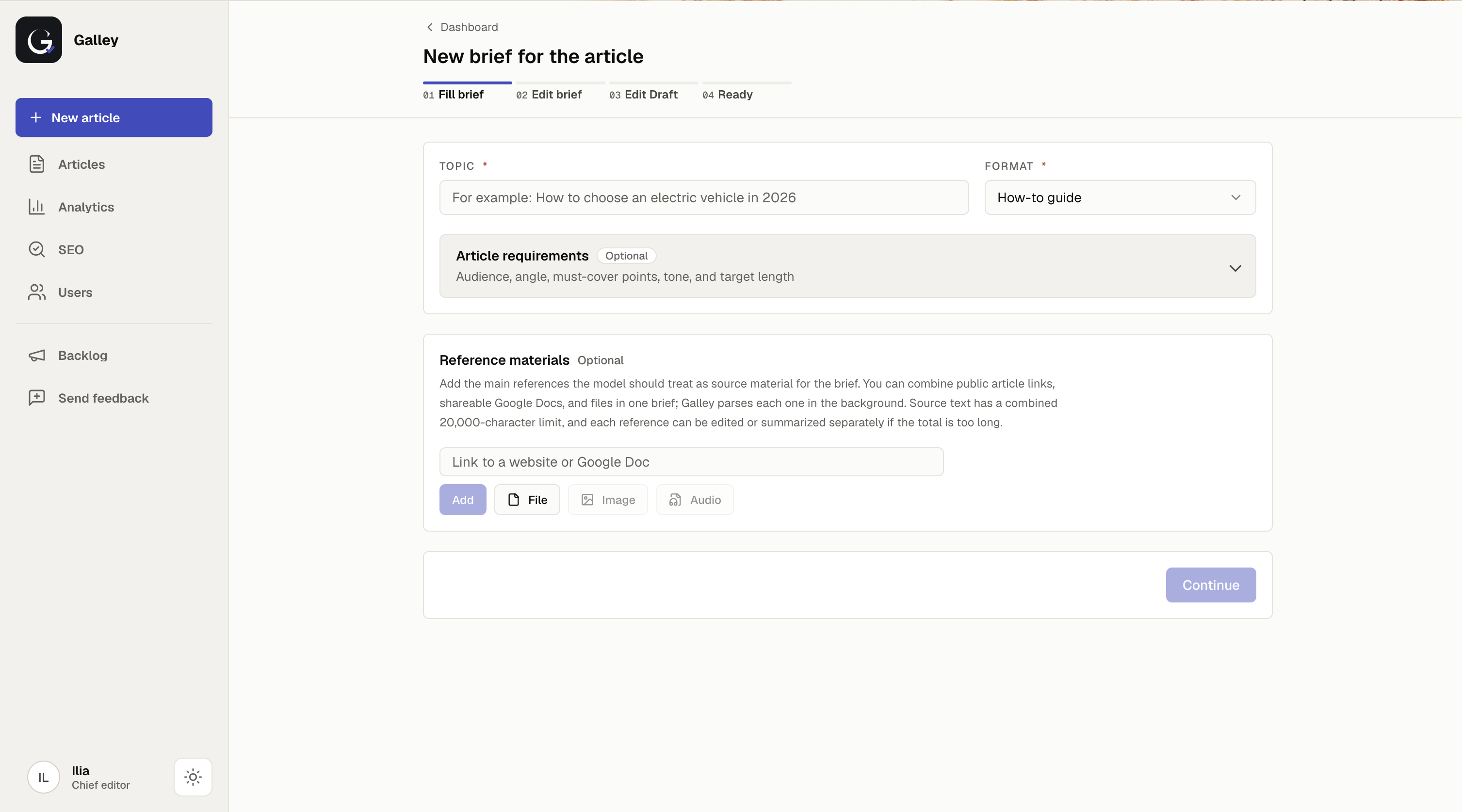
Galley editor — new article intake
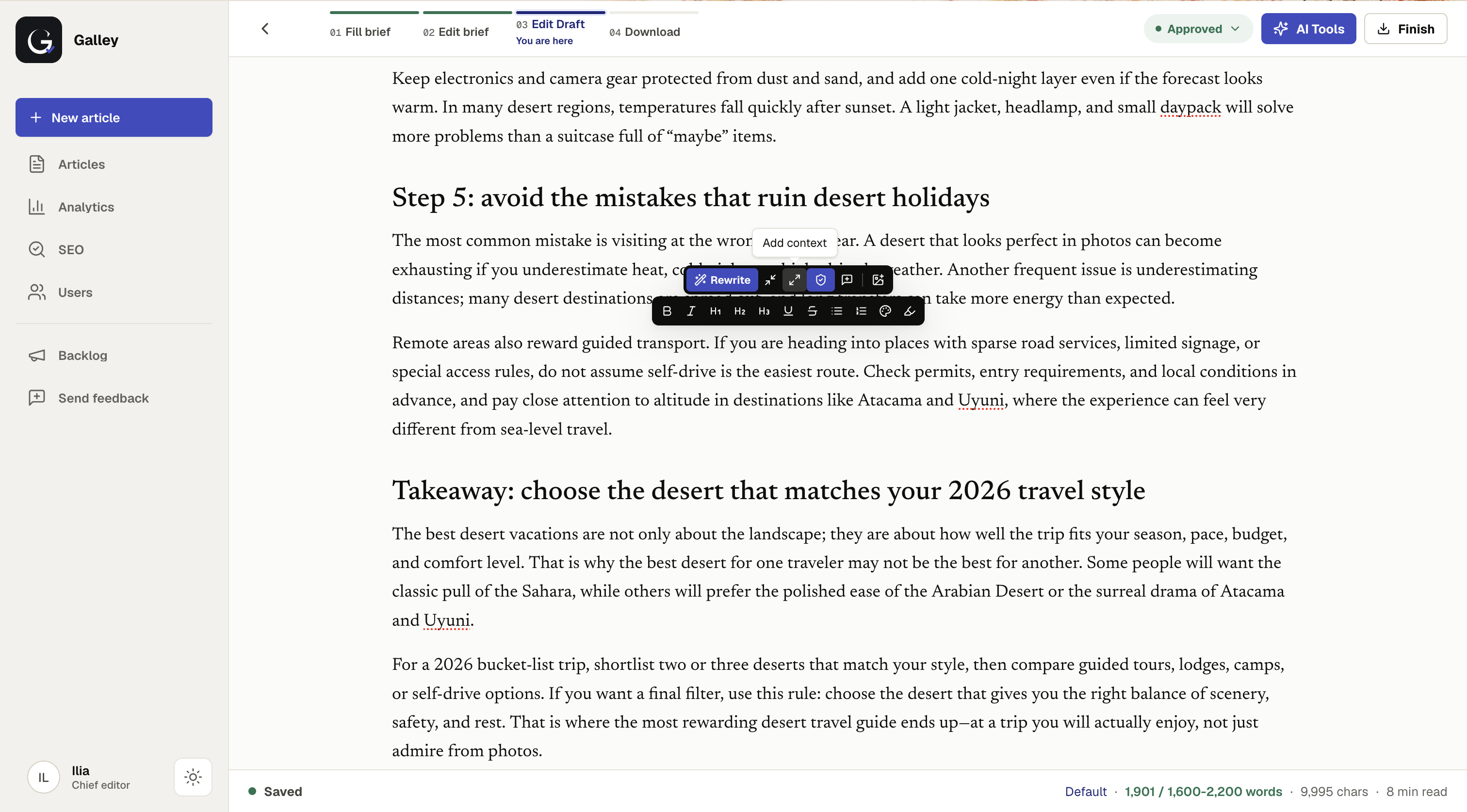
Galley editor — rewrite and formatting tools on selected text
What you get

A complete editorial toolkit

Your author's voice — from the first draft

Add personal prompts and article examples to guide rhythm, word choices and style. Include saved examples whenever a draft needs that voice.

Source-based fact-checking in the editor

Run fact-checking against open sources, review evidence and apply verified corrections without leaving the article.

SEO keyword research in the brief

When SEO research is enabled, Galley researches and expands keywords while generating the brief, then saves the selected keywords with it.

Brief compliance without manual checking

Galley compares the finished text against the original brief and surfaces any gaps before you ship.

How it works

Four easy steps to a finished article

The interface is intuitive from day one — no onboarding, no manual required.

1

Submit a brief

Describe the task: topic, angle, length, requirements. Galley understands plain language.

2

Get the first draft

Generate a ready draft using your prompt and, when selected, saved article examples.

3

Edit with AI

Highlight any paragraph and ask Galley to rewrite, shorten or strengthen it. Right in the editor.

4

Save or export

Copy the text, download in your preferred format, or hand off to your editor.

Pricing

Simple, transparent pricing

Start free. Contact us for full access.

Enterprise
Custom
tailored to your team
  • Custom usage and team limits
  • Upload images or generate them with AI inside the article
  • Source-based fact-checking with evidence and unconfirmed-claim flags
  • Style & editorial policy correction — banned phrasing, tone, house style
  • Brief compliance check — evaluates length, keywords, tone and structure
  • Rewrite a full article or selected text
  • Summarize uploaded references to a target length
  • Personal prompts and saved article examples
  • SEO keyword research during brief generation
  • Team and article analytics for editorial leads
  • Copy, HTML and Markdown export
  • Isolated team workspaces
  • Access to all available premium text models
Contact us
Frequently asked
How is Galley better than ChatGPT or any other LLM?
ChatGPT is a chat window that outputs text. Galley keeps the editorial workflow in one place — brief → draft → fact-check → edit → brief compliance → export — and lets you work with the underlying LLM through an interface built for editing the text itself and running checks on it.

One key difference is source-based fact-checking: Galley checks selected claims against real sources and flags anything unconfirmed. It also includes editorial-policy review, image tools, SEO keyword research at the brief stage and publish-ready export formats.

Under the hood, Galley runs on curated models wrapped in editorial quality control. You work toward a reviewed article, not a raw chat reply.
How is Galley different from other similar products?
Unlike most alternatives, Galley isn't built to churn out text optimized purely for search engines. SEO keyword research can support the brief, but the core product is the editorial workflow: producing useful content for readers with source checks, policy review and controlled editing.
How does paid access work?
The trial is self-serve. Full access is currently arranged directly based on your team and expected usage — contact us and we'll set up the right limits.
Is there a free trial?
Yes, and you don't need to write to us for it. Just click "Try Galley," create your workspace, and choose the trial option — you're in.
Get started

Ready to speed up your editorial workflow?

Try it on a real task from your team. First articles are on us.

Try Galley